Booking Lifecycle
IntroductionCopied!
The booking lifecycle outlines the journey a booking takes, from its creation to its final status. Understanding this process is essential for all stakeholders (Customer, Supplier and Seller) as it provides clarity on how bookings are handled, tracked, and processed within the system.
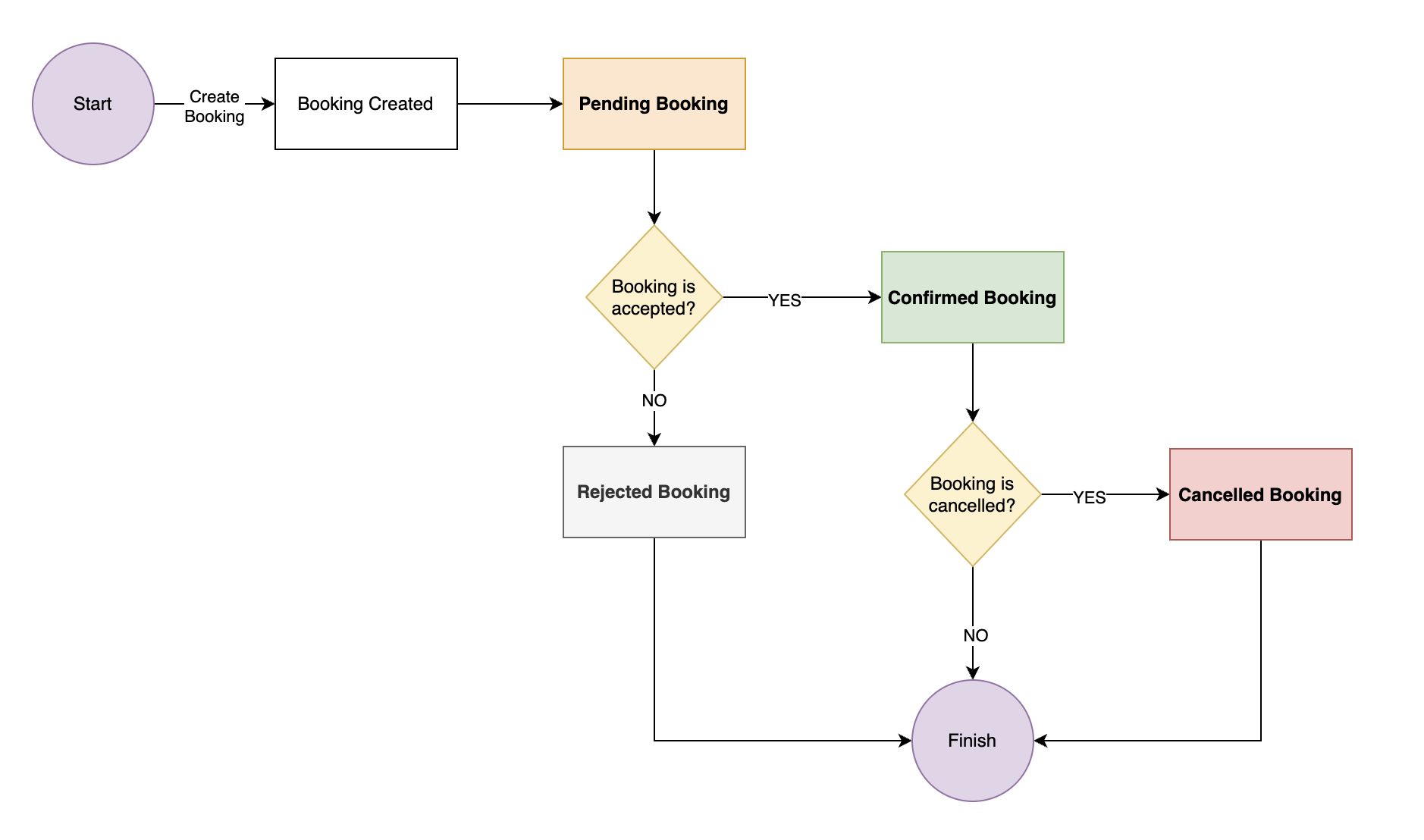
Below is a diagram explaining the booking lifecycle and its state transitions:
Booking CreatedCopied!
The booking lifecycle starts when a booking is created. At this stage, the booking exists in the system but has not yet been confirmed or rejected. It automatically transitions to the Pending status, where further action is required by the Supplier. At this point, all stakeholders are notified via email about the booking's current status.
⌛ Pending BookingCopied!
After the booking is created, it enters the Pending status. This means the booking is waiting for the Supplier to take action — either to confirm or reject the request. Based on the Supplier’s settings (configured within the kleesto dashboard), bookings may be automatically confirmed or require manual approval. In some cases, the Supplier may also set a specific time limit for making a decision. If this time limit passes without the booking being confirmed or rejected, it will automatically move to the Rejected status.
✖️ Rejected BookingCopied!
If the booking is not accepted, it transitions to the Rejected status. Rejected bookings do not proceed further and are effectively terminated. Once a booking is rejected, it can no longer be confirmed or modified, and the process is considered complete. At this point, all stakeholders are notified via email about the booking's rejection.
✅ Confirmed BookingCopied!
Once the booking request is accepted, it transitions to the Confirmed status. This is an important step that indicates the booking has been successfully validated, and the required resources or availability have been secured. At this stage, the booking is considered confirmed and is expected to proceed unless it is later cancelled. All stakeholders are notified via email about the booking's confirmation.
❌ Cancelled BookingCopied!
Even after a booking is confirmed, it can still be cancelled for various reasons (e.g., customer request, operational issues). When this happens, the booking transitions to the Cancelled status. This marks the end of the booking lifecycle, meaning the booking will no longer be processed or completed. At this point, all stakeholders are notified via email about the booking's cancellation.